


Recovering a Crypto Wallet in 2026: A Step-by-Step Guide to Seed Phrases, Private Keys and Old Bitcoin Wallets
Lost access to a crypto or bitcoin wallet? Restore it from a seed phrase, backup file or private key, and see how MPC wallets recover without one.
- Author
-
 Dmitry Tokarev
- Published
- Share
Wallet recovery starts with a fact that calms most people down: your coins never left the blockchain. A bitcoin wallet is a software app or a device that holds keys, not coins, so what you have lost is access, not the money itself. Whether you can get it back depends on two things: the recovery information you still hold, and the type of wallet you used.
If you have lost access to your crypto, you most likely still have something that works: words written on paper, an old file, a hardware device that only needs resetting, or a password you half remember. As bitcoin has grown and more people adopt bitcoin through phone apps, the ways to lose access have multiplied, and so have the ways back in. Below, we’ll guide you through each case with numbered steps, show where recovery is truly impossible, and explain how newer designs avoid the problem.
Crypto Wallet Recovery in 2026
- The answer: with a seed phrase, a backup file or a private key, you can restore a wallet on a new device, usually within minutes.
- Check first: look up your address on a block explorer. It shows whether the funds are still there or have been moved.
- The hard limit: without proper recovery information, nobody can restore a standard wallet, not the provider and not a paid recovery service.
- Safety: never type your recovery phrase into a website or send it to “support”. Legitimate help never asks for it.
- Newer designs: MPC, multisig and social recovery wallets survive a lost phone or lost backup words, but each has its own weak points.
- Inside: a decision tree, steps for every setup, and a table of how ten popular apps recover.
First, Don’t Panic: Your Bitcoin Is Still on the Blockchain
Every coin is recorded on a public ledger under your address. Losing a phone or deleting an app changes none of that: the balance stays put until someone with the right key signs a transaction. Before you try any fix, look up your address in a block explorer. If the balance is still there, nothing was stolen and you need to regain access. If it has moved to an address you do not recognize, that is theft, and the next steps are different.
Most lockouts fall into one of two groups. Losing the login, such as an app PIN, is usually easy to fix, because losing the phone does not mean losing access to your private key. Losing every copy of the keys is the serious case, and this is where designs differ most: a standard wallet has no answer, while newer ones, such as MPC wallets designed to be impossible to lose, can rebuild access after lost devices.
In the first hour, do not reset a hardware wallet you cannot unlock, do not type your words into any website, and do not reply to strangers who offer help after you post about your problem online.
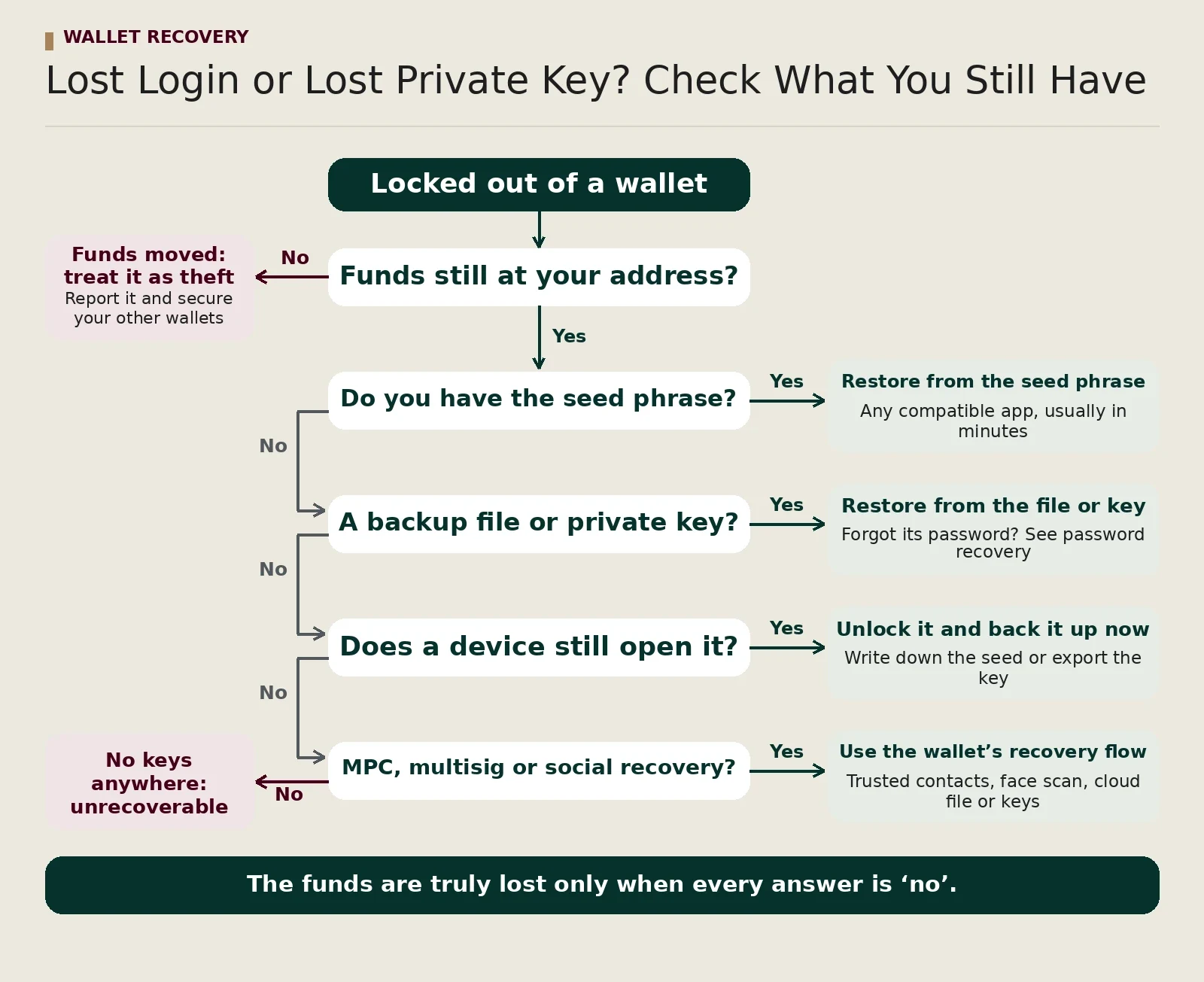
Lost Login or Lost Private Key? Check What You Still Have
Follow the tree from the top and stop at the first “yes”.
Seed Phrase, Private Key, Public Key, Backup File: Key Terms
| Term | What it is | Restores access? |
|---|---|---|
| Seed phrase | 12, 20 or 24 words, also called a recovery seed phrase, that regenerate every key | Yes, all of it |
| Private key | A secret string of letters and numbers that controls one address and lets you sign transactions | Yes, that address only |
| Public key and address | Each private key has a corresponding public key, from which the address is derived; you share it when someone sends bitcoin to you | No, it only shows the balance |
| Backup file | A wallet file such as Bitcoin Core’s wallet.dat, usually protected by a password | Yes, with its password |
| Key shares (MPC) | Pieces of signing power held by different devices or parties; no full key ever exists | Yes, through the provider’s built-in recovery: a few guided steps in the app, no technical skills needed |
How to Restore a Bitcoin Wallet from a Seed Phrase
Most apps call this backup a recovery phrase or seed phrase, and most follow the BIP-39 standard, so seed phrase wallet recovery works almost the same everywhere, and a wallet built on one is easy to restore. The exceptions are Electrum, which uses its own format, and newer Trezor devices, which default to 20 words. Follow these steps:
- Check what you have: the number of words, which app created them, and whether a passphrase (an optional extra word) was used.
- Verify wallet compatibility. Use the original app or any app that supports the same standard. Always ensure you download it from the official website or app store.
- Use a device you trust. Hardware wallets take the words on the device itself.
- Choose “I already have a wallet” or “Restore” and enter the words in their original order.
- Add the passphrase if one was set, then let the app sync and check that you can access your funds.
- Set a new PIN. If anyone else may have seen the words, move the funds to a new wallet with a fresh seed.
Takeaway: the words restore everything, in almost any app, as long as you use the same standard and passphrase.
Restored Wallet Shows Zero? Check the Address Type and Passphrase
An empty balance after restoring a wallet rarely means the money is gone. Usually the app is looking in the wrong place.
| Likely cause | What happened | Fix |
|---|---|---|
| Different address type | Bitcoin addresses follow standard paths: m/44’ (starting with 1), m/49’ (3), m/84’ (bc1q) and m/86’ (bc1p) | Switch the address type in settings and compare the first address with an old receipt |
| Missing passphrase | BIP-39 turns every passphrase into a valid but different account, so a wrong one opens an empty one | Enter the exact passphrase, including capitals and spaces |
| Network not enabled | The app shows only the coins it is set to track | Add the network or token manually |
Missing or Out-of-Order Seed Phrase Words
The BIP-39 list has 2,048 words, and the last word includes a checksum. A computer can test every candidate and keep only those that pass the checksum and lead to an address with funds.
| Your situation (12 words) | Combinations to test | Realistic? |
|---|---|---|
| One word missing, position known | 2,048 | Yes |
| One word missing, position unknown | 24,576 | Yes |
| Two words missing, positions known | About 4.2 million | Usually, with a recovery tool |
| All words known, order lost | About 479 million | Difficult |
| Three or more missing | Billions or more | Rarely |
| Whole phrase lost | 2 to the power of 128 | No |
Open-source tools such as btcrecover run these searches. Use one only on an offline computer, downloaded from its official repository.
Takeaway: a phrase with one or two words missing can often be rebuilt; a lost phrase cannot.
Restoring an Old Bitcoin Wallet from a Backup File or Private Key
Many old bitcoin wallets have no seed phrase at all, which makes them more challenging to recover. Bitcoin Core, once called Bitcoin-Qt, keeps its keys in a file named wallet.dat, and some early users only ever saved a single private key. Bitcoin wallet recovery from these still works, but the process of restoring a bitcoin wallet from a file is different.
Bitcoin Core: Restoring an Old Bitcoin Wallet from wallet.dat
Since version 30.0, released in October 2025, Bitcoin Core can no longer load old wallet.dat files directly; they must first be migrated to the newer descriptor format. Versions 30.0 and 30.1 had a rare migration bug that could delete files, fixed in 30.2 in January 2026.
- Copy the file first and keep the original on separate media. Consider hardware failures: if the file sits on an aging laptop, copy the whole disk.
- Install Bitcoin Core 30.2 or later from the official website.
- Migrate the file with the built-in migration tool, entering the original password if it has one. The tool keeps a copy of the old file in case anything goes wrong.
- Let Bitcoin Core rescan the chain. Once the wallet is restored, move the funds to a modern app with a recovery phrase.
Electrum and Other Software Wallets
Software wallets store private keys and seed phrases on your phone or computer, protected by a password. A software wallet like Electrum allows users to rebuild everything from its seed through the “I already have a seed” option, but its format is not BIP-39, so restore an Electrum seed in Electrum. Without the seed, the wallet file is your only copy, and Electrum says its password cannot be recovered. Some mobile apps, Trust Wallet among them, can also keep a password-protected copy of the words in iCloud or Google Drive: sign in to the same cloud storage account and restore it using that password.
Restore Wallet from Private Key: Import or Sweep
A single private key controls one address, and software wallets allow two ways to use it:
- Sweep (recommended): the app sends everything from that address to an address protected by your current seed, so the old key is no longer needed.
- Import: the key is added to a separate account. In Electrum, imported keys cannot be recovered from a seed, so that account needs its own copy.
Takeaway: a saved file or private key restores an old wallet, but treat the original as irreplaceable and always work on a copy.
Hardware Wallet Recovery: Lost or Stolen, Broken or Reset
Devices like hardware wallets are only safe boxes: the wallet’s private keys live in the recovery phrase. Hardware wallet recovery is simple with the words and impossible without them, unless a paid service was set up in advance.
| Situation | What happens | What to do |
|---|---|---|
| Forgotten PIN | Ledger resets after 3 wrong attempts; Trezor after 16 (10 on the Trezor Safe 7) | Let it reset, then restore from the words |
| Broken device | The keys are still in your backup | Restore it on any compatible device |
| Lost or stolen | The PIN protects it, but a thief has time and physical access | Restore on a new device, then move the funds |
| Device and backup both lost | No copy of the keys remains | Unrecoverable, unless you subscribed to a service such as Ledger Recover, a paid, ID-verified service provided by Coincover |
If the device is lost or stolen:
- Get a new device that supports your format: 24 words on Ledger; 12, 20 or 24 on Trezor, depending on the model.
- Enter the words on the device itself to restore the wallet, never on a computer keyboard.
- Create a fresh account with new words and send the funds to it, so the old words no longer control anything.
- Store the new backup away from the device.
Takeaway: the device is replaceable; the backup is not.
Wallet Password Recovery: Forgotten Passwords and Encrypted Backups
Wallet password recovery depends on what the password protects. Most app passwords only lock the app on one device; the keys underneath are unaffected. Forgotten passwords become serious only when they lock the sole copy of your keys.
| Password type | What it protects | If you forget it |
|---|---|---|
| App password or PIN | Opens the app on this device | Reset the app and restore from the words; MetaMask, for example, needs the recovery phrase to reset a forgotten password |
| Wallet file password | Locks the keys inside wallet.dat or an Electrum file | Restore from the seed if one exists; otherwise only the original password opens it |
| Cloud copy or social login password | Unlocks words stored in iCloud, Google Drive or behind a Google, Apple or Telegram login | The provider cannot reset it; restore from the seed phrase written on paper |
| BIP-39 passphrase | Creates a separate account on top of the phrase | No reset; every guess opens a valid but different account |
If the password guards your only copy and you half remember it:
- Copy the file and work offline on the copy.
- List every candidate: old passwords, variations, capitals and common typos.
- Run an open-source tool such as btcrecover; it tries thousands of variations of what you remember.
- Never upload the file to a website. Once it opens, move the funds to a fresh account.
Takeaway: a forgotten password is a nuisance when you still have your words, and a guessing game when you do not.
When Lost Wallet Recovery Is Impossible: The Missing-Key Limits
Lost wallet recovery has a hard floor. Without a seed phrase or private key, and with no built-in recovery, nobody can move the funds again. A 12-word phrase holds 128 bits of randomness, beyond what any computer can guess, and no court can order a key into existence.
- The landfill hard drive. In 2013, a hard drive holding the wallet.dat file for about 8,000 bitcoin that James Howells had mined in 2009 went to a landfill in Newport, Wales. The High Court dismissed his claim against the council in January 2025, and the Court of Appeal refused permission to appeal in March 2025.
- Two guesses left. Programmer Stefan Thomas kept the keys to 7,002 bitcoin on an IronKey drive that erases itself after 10 wrong passwords. In January 2021, he said he had already used 8.
It is also a dead end when the only file is locked and the password cannot be found, or when a Google or Apple login is lost and the phrase was never exported.
Takeaway: anyone who promises recovery in these situations is selling something, and it is not recovery.
Why Traditional Seed Phrase Backup Is Broken
Imagine a bank handing you a password and saying: lose it and your money is gone, let anyone see it and your money is theirs, and we cannot help either way. No bank could operate like that. Yet in 2026 it is still how most self-custody wallets work.
| If this happens | At a bank | With a recovery phrase |
|---|---|---|
| You forget the password | Reset it with ID | Restore from the words, or lose everything |
| Someone steals it | Fraud team, frozen account, sometimes a refund | Funds gone; transfers cannot be reversed |
| The owner dies | Heirs claim with a death certificate | Heirs need the words, or the funds are locked |
The phrase asks you to do two contradictory things: keep it where you will always find it, and where nobody else ever will. Every extra copy is another chance for theft; every copy you avoid makes loss more likely. That is why newer designs spread the power to recover across devices, people and companies instead.
Takeaway: the seed phrase is not a user error waiting to happen; it is a design that makes user error fatal.
Recovery by Design: MPC, Multisig and Social Recovery Wallets
Three designs remove the single secret. They differ in where the power to recover sits and who must cooperate to use it.
How MPC Wallet Recovery Works Without a Private Key
Unlike traditional wallets, an MPC design splits signing power into key shares at setup, held for example by your phone, the provider and an independent recovery party. In a two-of-three setup, any two shares sign together, and no full private key ever exists. That makes non-custodial wallet recovery possible without anyone holding your whole key:
- Install the app on a new phone and sign in.
- Prove it is you with factors set up in advance: trusted contacts, a face scan, a cloud recovery file or your email.
- Wait out the security delay, if there is one; it gives you time to stop a recovery you did not start.
- Receive a fresh share. Your addresses stay the same, and the old share stops working.
The limits are real. Without the factors you set up beforehand, users may still hit a dead end, and losing more shares than the threshold allows is final. Because a company usually holds one share, check its published exit path.
Multisig Wallet Recovery
A multisig vault uses several independent keys, two of three for example, and the network checks the signatures. To recover, gather enough remaining keys, find the vault configuration (the public keys and paths of every key), create a replacement key and move the funds to a new vault. The drawback: each key usually has its own seed phrase, so a two-of-three vault can mean three phrases to protect.
Social Recovery and Google or Apple Login Wallets
In a social recovery wallet, a design Ethereum co-founder Vitalik Buterin argued for in 2021, a majority of guardians, such as friends, family or your other devices, can approve a new signing key if you lose yours. Login apps such as MetaMask and Phantom instead back up your words behind a Google or Apple account, plus a password or PIN where required. The trade-off is a new single point of failure: lose that account and recovery fails unless you saved the words.
Takeaway: all three designs survive a lost phone or lost words, but only if the recovery path was set up before you needed it.
How Recovery Works in Popular Wallets in 2026
What each app needs to restore access, and which losses it survives, as each provider describes it in November 2026. It is a map, not a ranking, so they are listed in alphabetical order; for setup details, check the specific wallet provider’s help pages.
| Wallet | Design | What restores access | Lost device | Lost backup or recovery factors | Provider shuts down |
|---|---|---|---|---|---|
| Bitcoin Core, Electrum | Open-source software | wallet.dat (Core); seed or wallet file (Electrum) | ✓ with a copy | ✗ | ✓ no company involved |
| Bitkey | 2-of-3 bitcoin multisig: phone, hardware, server | Cloud copy unlocked by the hardware, Recovery Contacts; 7-day wait to replace a key | ✓ | ✓ no words to lose | ✓ Emergency Exit Kit |
| Bron | 2-of-3 MPC: user device, Bron, Qrypt | Codes from 2 Guardians or a FaceScan, then a 48-hour delay; otherwise self-recovery through e-mail after up to 30 days | ✓ | ✓ no words to lose | ✓ trusted device and Qrypt rebuild the signing key |
| Casa | 2-of-3 or 3-of-5 multisig vault | Your remaining keys plus the Casa Recovery Key (security questions or video call) | ✓ | ✓ a lost key can be replaced | ✓ with enough of your own keys |
| Ledger | Hardware | 24 words; optional paid Ledger Recover with ID checks | ✓ | ✗ unless subscribed to Ledger Recover | ✓ with the words |
| MetaMask | Software, 12 words | The words, or Google, Apple or Telegram login plus password | ✓ | ✓ only with social login | ✓ with the words |
| Phantom | Software, 12 words | The words, or a Google or Apple account (plus a four-digit PIN on older email wallets) | ✓ | ✓ only with Google or Apple login | ✓ with the words |
| Trezor | Hardware | 12-, 20- or 24-word backup, or enough shares of a multi-share backup | ✓ | ✓ only with multi-share | ✓ with the words |
| Trust Wallet | Software, 12 words | The words, or a password-protected iCloud or Google Drive copy | ✓ | ✓ only with the cloud copy | ✓ with the words |
| Zengo | 2-of-2 MPC: phone and Zengo server | Email plus a recovery file in your cloud; face scan recommended | ✓ | No words to lose; ✗ only if the email or the cloud recovery file is lost (a second email and cloud can be added) | Independent escrow and trustee arrangement |
Every option has a cost. Seed-based apps restore in minutes almost anywhere but put the whole burden on one copy. Multisig on Bitkey and Casa survives a lost key, at the price of more keys and a new vault after each replacement. MPC removes the words, but access depends on factors set up in advance and on waiting times: in Bron, for example, Guardians and FaceScan only work 30 days after setup, and without them recovery takes up to 30 days.
Verdict: seed-based wallets are best for users who can protect one copy and want to restore anywhere; multisig is best for bitcoin savers who want no single point of failure and rules enforced on-chain; MPC is best for users who want nothing to write down and one process across many networks.
Seed Phrase vs MPC Wallet Recovery in 2026
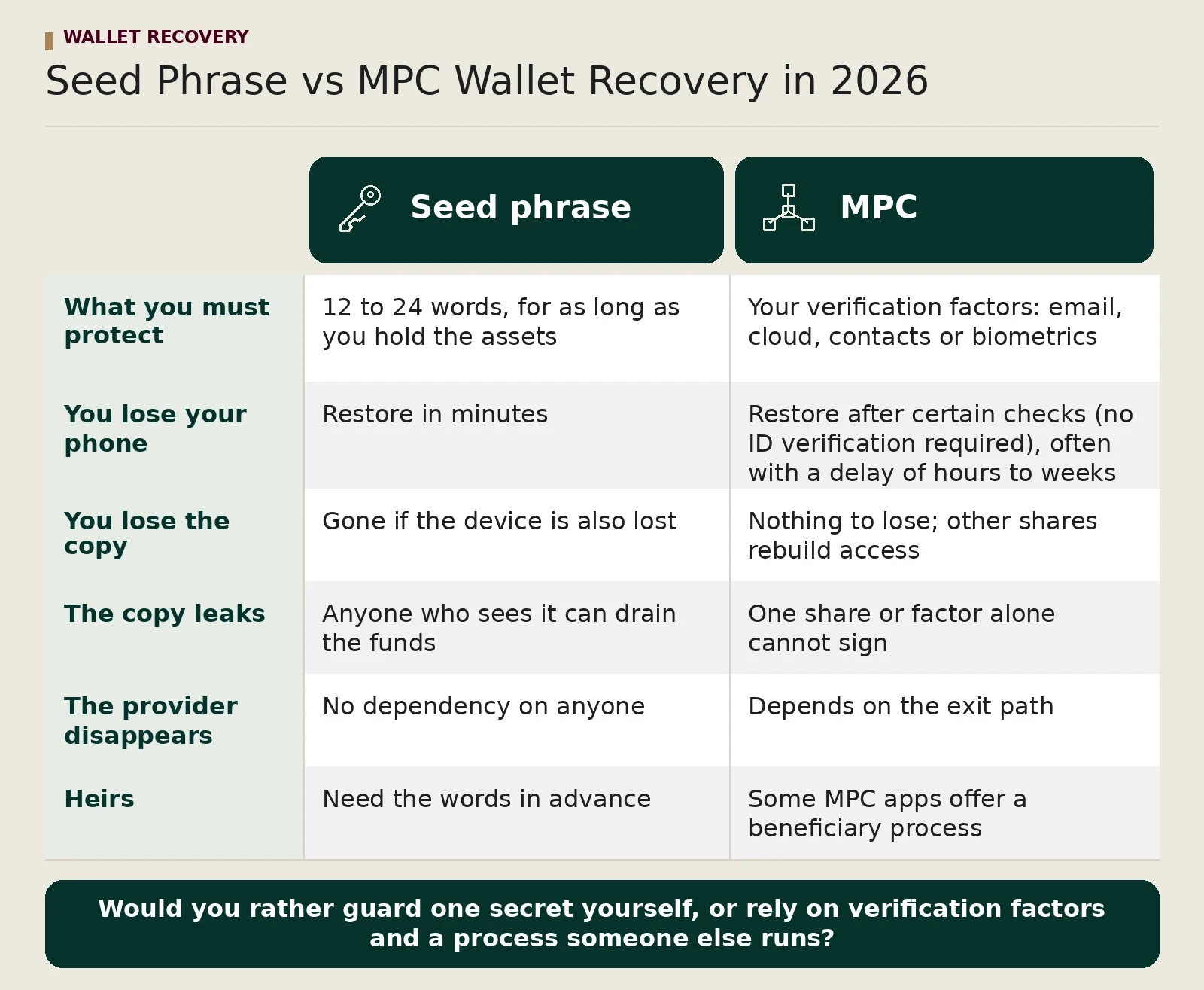
The deciding question: would you rather guard one secret yourself, or rely on verification factors and a process someone else runs?
| Situation | Seed phrase | MPC | Verdict |
|---|---|---|---|
| What you must protect | 12 to 24 words, for as long as you hold the assets | Your verification factors: email, cloud, contacts or biometrics | Words for one self-contained copy; MPC if you would rather guard nothing |
| You lose your phone | Restore in minutes | Restore after certain checks (no ID verification required), often with a delay of hours to weeks | The words are faster; MPC needs nothing written down |
| You lose the copy | Gone if the device is also lost | Nothing to lose; other shares rebuild access | MPC |
| The copy leaks | Anyone who sees it can drain the funds | One share or factor alone cannot sign | MPC |
| The provider disappears | No dependency on anyone | Depends on the exit path | Seed phrase, unless your provider has a documented exit path |
| Heirs | Need the words in advance | Some MPC apps offer a beneficiary process | MPC, where offered |
Verdict: seed phrase recovery is best for technical users who want full independence and can store a metal backup properly. MPC is best for anyone who cannot afford a single point of failure: families, larger holders and people who have already lost their words once.
Best Practices for Secure Backups in 2026
Once you regain access, fix the cause. These best security practices cover most cases above:
- Store your seed phrase securely on steel rather than paper, which burns and fades. Keep a seed phrase in safe, separate places, never in photos, email or notes apps; secure storage beats clever hiding.
- Write down the wallet’s recovery information: which app created the words, the address type and whether a passphrase exists. Keep the passphrase itself elsewhere.
- Test the copy by restoring it on a spare device before you rely on it.
- Keep private keys offline for anything you do not spend often, and use strong, unique passwords for any password-protected file.
- Keep verification factors current in MPC and login apps: email, cloud account and trusted contacts.
- After any exposure, move everything to a fresh account. To ensure the safety of digital assets held in more than one wallet, check each one.
Avoiding Wallet Recovery Scams
People who lose access due to a broken phone or a lost phrase are prime targets. The FBI’s Internet Crime Complaint Center counted 10,516 complaints about recovery scams in its 2025 report, with $1.4 billion in reported losses. In August 2025, it warned that fraudsters pose as law firms, claim ties to government agencies and often already know details of a victim’s losses.
Warning signs: unsolicited offers of help, requests for your private key or the seed phrase, upfront fees in crypto or gift cards, and promises to recover anything. No wallet provider, exchange or police force will ever ask for your private key or recovery phrase. If you are considering paid help with a password-protected file, make sure the helper is not a fraudster, and report fraud at ic3.gov if detected.
Takeaway: if someone needs your words to help you, they are not helping you.
Frequently Asked Questions
Can I recover a crypto wallet without a seed phrase?
Only if another copy of the keys exists. Bitcoin wallet recovery without seed phrase backup works from a wallet file, a private key, a device on which you still have access to the wallet, or a recovery method built into the app, such as MPC, multisig or a cloud copy. Without a backup file or recovery phrase of any kind, the funds cannot be recovered.
How do I recover an old bitcoin wallet?
Search old computers, drives and email attachments for a wallet.dat file and copy it before anything else. Then install Bitcoin Core 30.2 or later, migrate the file and enter its original password if it has one.
What should I do if my hardware wallet is lost or stolen?
Restore the words on a new device, then move the funds to a new wallet with a fresh phrase. A thief cannot use the old device without the PIN, but moving the funds removes the risk.
Can a wallet provider reset my password or recover my phrase?
Not for a self-custody wallet: the provider never sees the wallet’s seed phrase or your password. Custodial accounts at exchanges are different, and support can restore them after identity checks.
How long does wallet recovery take?
With the correct recovery information, a few minutes plus syncing. Apps with built-in recovery often add a security delay of hours to weeks, depending on the method.
Are crypto wallet recovery services legitimate?
Some specialists do help owners crack the password of a file they hold. None can recover funds when no copy of the keys exists, and no legitimate service needs your phrase.
Sources
All wallet facts were checked on the providers’ own pages on November 22, 2026.
- Standards: BIP-39 (seed phrases and passphrases), BIP-84 and BIP-86 (derivation paths).
- Bitcoin Core: 30.0 release notes (October 10, 2025), wallet migration bug notice (January 5, 2026) and 30.2 release notes.
- Howells case: Howells v Newport City Council [2025] EWHC 22 (Ch) (January 9, 2025) and Local Government Lawyer on the Court of Appeal refusal (March 2025).
- Stefan Thomas: Cointelegraph, reporting The New York Times (January 2021).
- FBI: 2025 Internet Crime Report figures, as reported by The Block (April 12, 2026), and IC3 public service announcement I-081325-PSA on fictitious law firms (August 13, 2025).
- Vitalik Buterin, Why we need wide adoption of social recovery wallets (January 11, 2021).
- Bron Help Center: Access Recovery, MPC Security and Private Key Recovery When You Can’t Use Bron.
- Provider documentation, named without links: Electrum (FAQ and seed phrase documentation); MetaMask (social login, password reset); Phantom (restoring a wallet, Google and Apple login); Trust Wallet (recovery phrase storage and cloud backup); Ledger (PIN code and Ledger Recover); Trezor (PIN protection and backup types); Bitkey (how Bitkey works, Delay + Notify); Casa (keys, Casa Recovery Key, shutdown); Zengo (Recovery Kit and security model).
Disclaimer:
This article is provided for general informational purposes only and does not constitute financial, investment, accounting, tax, or legal advice. Bron is a self-custodial software wallet. While Bron’s architecture is designed to eliminate single points of failure and reduce certain risks, the use of blockchain technology and self-custodial wallets involves inherent operational, technical, governance, and security risks, including risks related to user configuration, device compromise, social engineering, or software vulnerabilities. Users remain solely responsible for evaluating their own circumstances, security practices, and risk tolerance when using any software to manage digital assets.