


Knowledge Is Power: Financial Clarity in a Decentralized World
Crypto investors deserve readable reports — for taxes, audits, and peace of mind. How Bron turns on-chain activity into accountant-grade financial clarity.
Nothing matched that
Did you mean ?
Search is unavailable
The index could not be loaded.
The Bron application is provided as a software tool for users to interact directly with blockchain networks and decentralized protocols.
 The Impossible to Lose Wallet Bron: non-custodial, no seeds, no ID
  Secure and Private by Design Biometric signing, hidden accounts, 24/7 support
  Crypto Meets Fiat Move between fiat and crypto, compliantly
  Cross-Chain Swaps Swap across chains with top rates
  Digital Inheritance Securely pass assets to beneficiaries
  Multi-Role Access and Reporting One wallet, shared control, instant reports
  Earn & Stake T-Bill yield and one-click staking, self-custodial
  NFTs Done Right Showcase NFTs and earn Bron perks
  The Wallet Agents Deserve A self-custodial wallet built for AI agents
  Bron for Business Self-custodial treasury for companies
Our policy engine works across all supported networks, including Bitcoin, Ethereum, Solana, HyperCore and HyperEVM, Tron, Canton Network, Ripple, Gram, all Layer 2s, and others.
Need your accountant to prepare taxes or a family member to have visibility of your shared holdings? You can configure view-only permissions, giving trusted parties ability to monitor balances and transactions without signing authority. You stay focused on what matters while others work with full visibility and zero execution risk.
Get startedSet up shared workspaces with configurable transaction limits. Smaller transactions can be approved individually, while larger transfers, swaps, or DeFi interactions may require joint approval. This makes Bron ideal for managing family assets and introducing loved ones to crypto in a controlled, trusted environment. Fully customisable to support every family's needs.
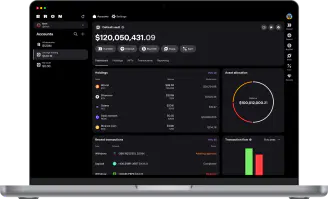
Get startedWelcome to crypto reporting the way it should have worked from the very beginning. Simply select a date range and download a clean Excel file with all your transfers, swaps, staking rewards, and other transactions, fully organized and easy to understand.
For tax reporting, portfolio tracking, or accounting, generate precise balance snapshots to see the exact composition of your wallet at any point in time — ideal for tax filings and financial reporting.
Get startedTo make reporting effortless, you can add notes to any transaction you perform. These notes appear directly in your reports, ensuring you always know why a transaction happened — not just when it happened.
Get started